AI Saree Photoshoot: How to Get Model Photos Without a Studio
Updated May 2026 · 6 min read
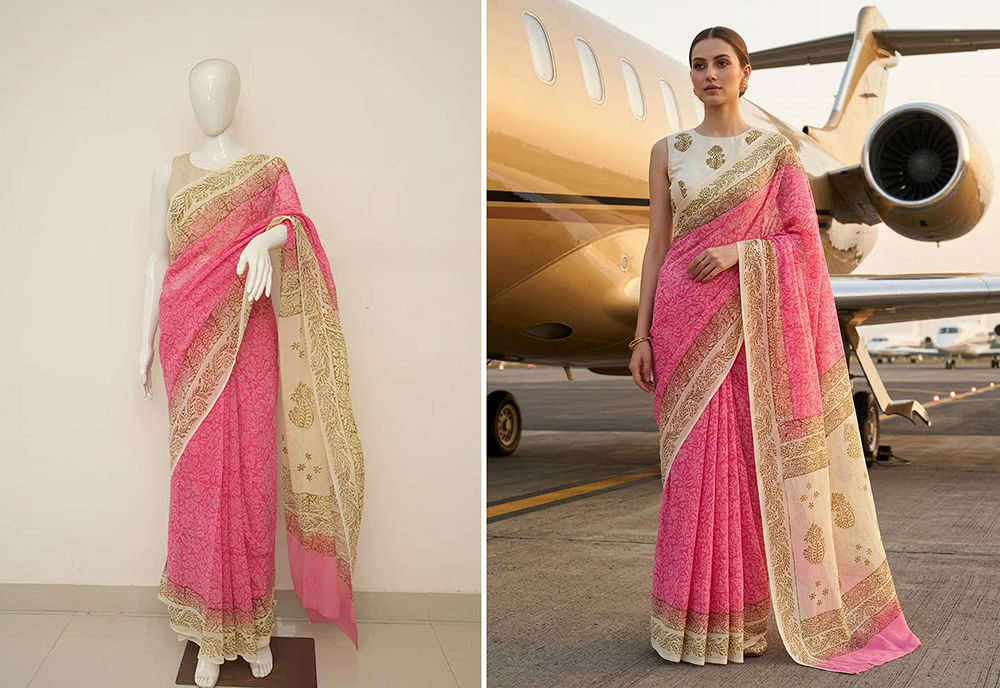
A traditional saree photoshoot is expensive and slow: you book a model, a photographer, a studio or location, a stylist, and a makeup artist — then wait days for editing. For a boutique launching a festive collection of 40 sarees, that can mean weeks of work and a large bill before a single product goes live.
An AI saree photoshoot removes almost all of that. You upload a clear photo of the saree, choose your model and styling, and get a photorealistic on-model image in minutes. This guide explains exactly how it works, how to get the best results, and what to watch out for.
What is an AI saree photoshoot?
An AI saree photoshoot uses generative AI to "dress" a virtual model in your real garment. Instead of photographing a person, you give the AI a photo of the saree itself — flat lay, on a hanger, or a ghost-mannequin shot — and it generates a realistic model wearing it, complete with natural pleats, pallu drape, and a styled background.
The key difference from generic AI image tools is garment accuracy. A good fashion AI preserves the exact fabric, color, weave, zari work, and embroidery from your source photo, so the model image matches the product a customer actually receives.
How to create an AI saree photoshoot in 4 steps
1. Start with a clean garment photo
Lay the saree flat (or hang it) on a plain, contrasting background with even lighting. Make sure the border, pallu, and any embroidery are clearly visible. The cleaner the input, the more accurate the result.
2. Upload and choose your model
Upload the photo to VERA Fashion AI and select an Indian model, then refine details like skin tone, hairstyle, and age to match your audience. For sarees, an Indian model with culturally appropriate styling builds the most buyer trust.
3. Set pose and background
Pick a pose and a background — studio, outdoor, or a festive/luxury setting — or let the AI choose automatically. For ethnic wear, a clean studio or a soft editorial backdrop usually converts best on marketplaces.
4. Generate, review, and export
Generate the image, review the drape and detail, request refinements if needed, and export in high resolution (up to 4K) for your website, Instagram, or marketplace listing.
Getting the drape and embroidery right
Sarees are harder than most garments because the drape carries the whole look. To keep results realistic:
- Use a high-resolution source photo so the AI can read the weave and embroidery.
- Show the full pallu and border in the input — these are the most recognizable parts of a saree.
- Generate a few variations and pick the most natural pleating.
- Add a close-up shot for product pages so buyers can see the fabric detail.
Why Indian fashion brands are switching to AI
For ethnic-wear sellers, AI photoshoots solve three real problems at once:
- Speed: launch a festive collection in a day instead of weeks.
- Cost: cut photography spend dramatically — no model, studio, or travel.
- Diversity: show the same saree on different models, skin tones, and settings to reach more buyers.
It works the same way for lehengas, Punjabi suits, salwar kameez, sherwanis, and wedding wear — and for marketplace listings on Amazon, Flipkart, Myntra, and your own store.
Frequently asked questions
Can AI create a saree photoshoot from a flat photo?
Yes. Upload a clear flat photo of the saree and the AI generates a photorealistic model wearing it, with accurate pleats, pallu drape, and embroidery detail — no studio or model required.
Will the embroidery and zari detail stay accurate?
Yes. The AI preserves fabric texture, weave, zari work, and embroidery from your source photo so the generated image matches the real product.
Can I choose an Indian model and skin tone?
Yes. You can select an Indian model and refine skin tone, hairstyle, pose, and background to match your target market.
Try an AI saree photoshoot free
Upload one saree and see it on a photorealistic model in seconds. Free trial — no studio, model, or camera.
Start Free Trial