Flat Lay to Model: Turn Product Photos into On-Model Shots with AI
Updated May 2026 · 6 min read
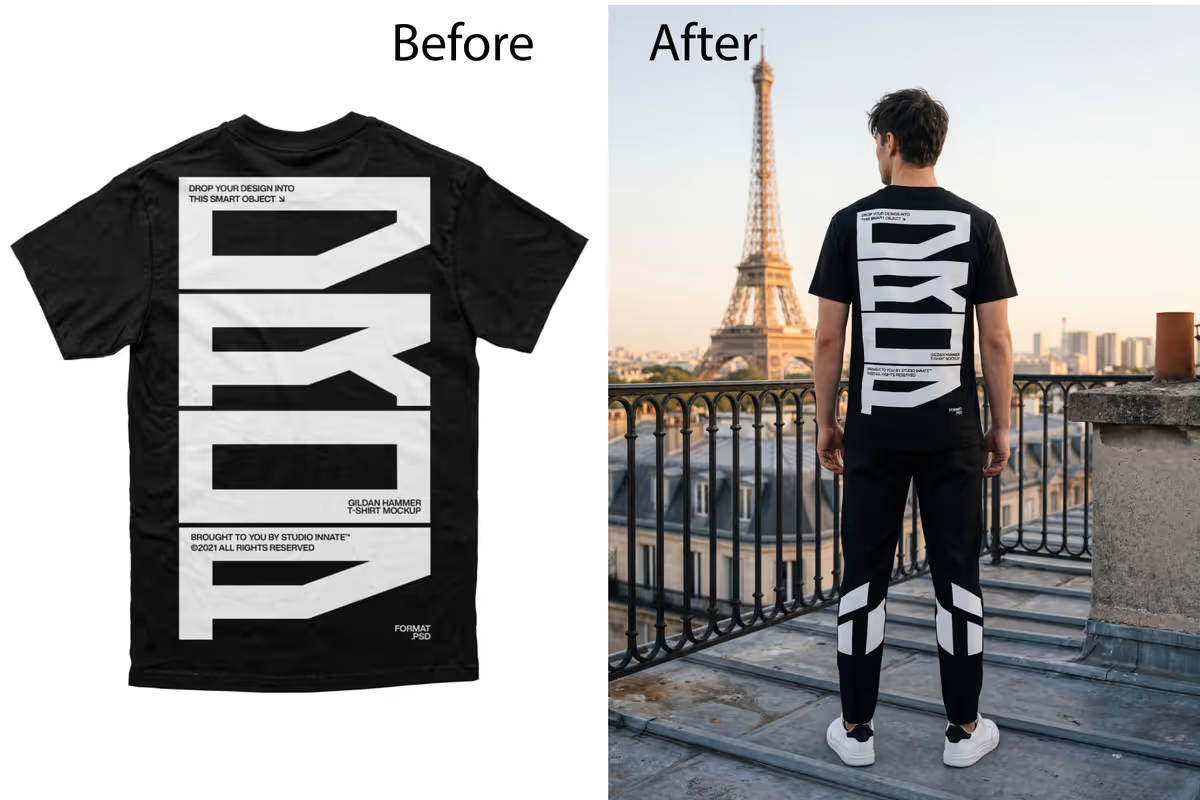
Flat lays are easy to shoot but hard to sell with. Shoppers want to see how a garment actually looks worn — fit, length, and drape on a real body. The problem is that getting on-model product photos traditionally means booking a model and a shoot for every new style. AI removes that step: you can turn a flat lay, a hanging shot, or a ghost-mannequin image into a photorealistic on-model photo in minutes.
Why on-model photos sell better than flat lays
On-model imagery answers the questions a flat lay can't: How long is it? How does it fit? What does it look like in motion or styled with other pieces? That added confidence is exactly why on-model photos typically lift conversion and reduce returns compared with flat-lay-only listings.
What kinds of photos can you convert?
- Flat lays — the garment laid flat and shot from above.
- Hanging shots — on a hanger against a plain wall.
- Ghost-mannequin / invisible mannequin — the most detail-rich input.
- Sketches — even a fashion sketch can be turned into a styled model image.
How to turn a flat lay into a model photo (step by step)
- Capture a clean flat lay. Plain, contrasting background, even lighting, the full garment in frame with seams and detail visible.
- Upload and choose your model. In VERA Fashion AI, select model type (woman, man, kids), country, and skin tone to match your audience.
- Set pose and background. Pick a pose and a studio, outdoor, or lifestyle background — or let the AI choose what suits the garment.
- Generate, review, and export. Check the fit and detail, request refinements, then export in up to 4K for your store and marketplace listings.
Tips for the most realistic results
- Higher input quality = better output. Sharp, well-lit source photos give the AI more detail to work with.
- Lay garments neatly. Smooth out folds so the AI reads the true shape.
- Generate variations. Try a couple of poses and backgrounds and keep the best.
- Match the model to your buyer. Consistent model styling across your catalog builds a recognizable brand look.
Works for every category
The same flat-lay-to-model workflow handles t-shirts, hoodies, dresses, activewear, swimwear, kids' wear, and Indian ethnic wear like sarees and lehengas. If you sell ethnic wear, see our AI saree photoshoot guide for category-specific tips, and the cost comparison to see how much you save.
Turn your first flat lay into a model photo
Upload a product photo and get a photorealistic on-model image in seconds. Free to start.
Start Free Trial